> ## Documentation Index
> Fetch the complete documentation index at: https://docs.aodeploy.com/llms.txt
> Use this file to discover all available pages before exploring further.
# Logs
> Inspect build output and execution details for your deployments and runs.
## Deployment logs
Each time you run `ao deploy`, AO creates a deployment record. Open any deployment from your dashboard to see its build metadata and logs.
### Details
| Field | Description |
| ----------------- | -------------------------------------- |
| **Deployment ID** | Unique identifier for the deployment |
| **Status** | `building`, `succeeded`, or `failed` |
| **Start** | Timestamp when the build started |
| **Duration** | Total time the build took |
| **Framework** | Framework detected from your `ao.toml` |
### Build logs
Build logs capture the output of the container build process, dependency installation, image layering, and any errors that occur before your agent is ready to run. Lines written to `stderr` are highlighted in red.
If your deployment fails, check the build logs first. Common causes are
missing dependencies in `requirements.txt` or an invalid `entrypoint` in
`ao.toml`.
***
## Run logs
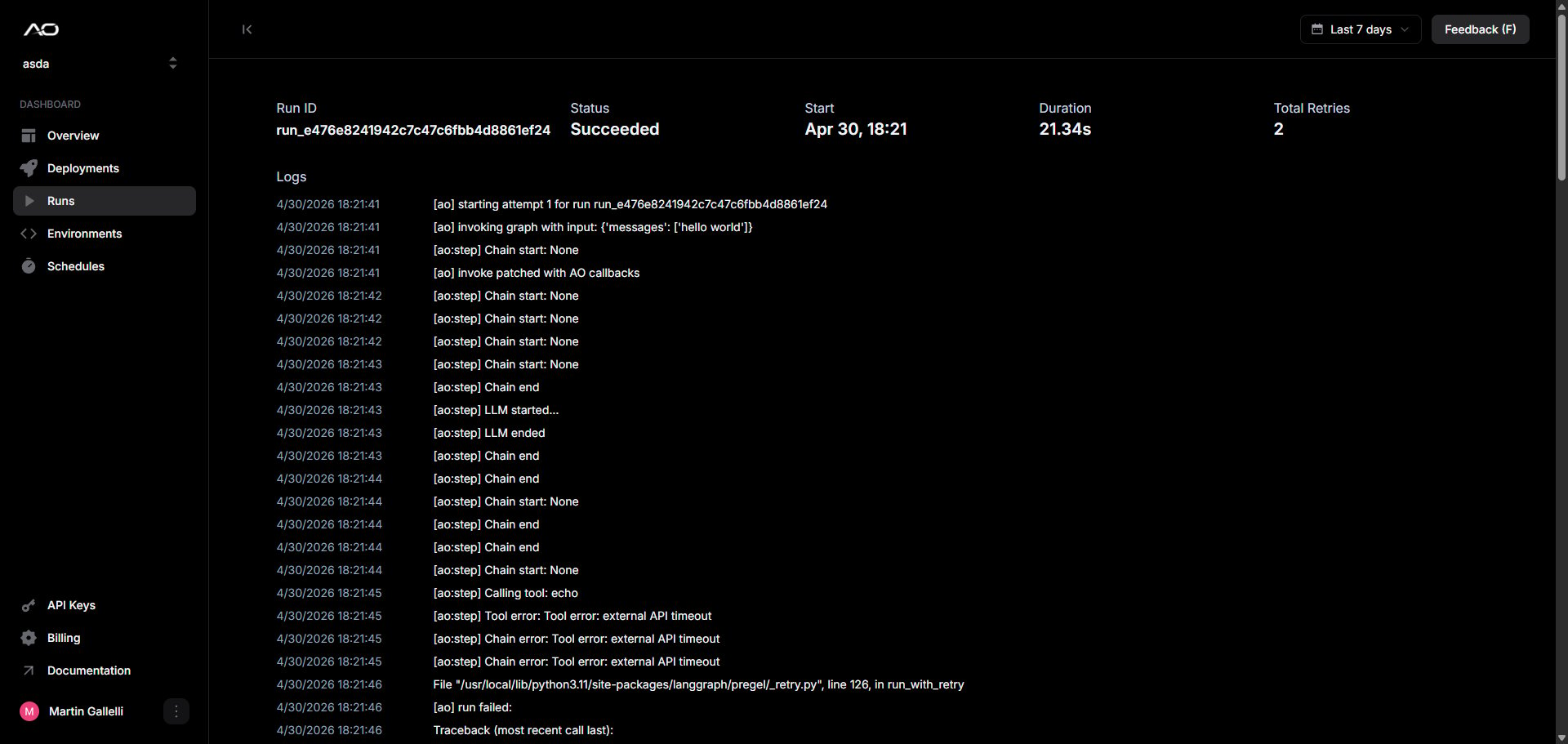
Every time your agent executes, AO captures a full record of that run. Open any run from the deployment detail page to see its metadata and logs.
 ### Details
| Field | Description |
| ----------------- | ----------------------------------------------- |
| **Run ID** | Unique identifier for the run |
| **Status** | `running`, `succeeded`, or `failed` |
| **Start** | Timestamp when the run began |
| **Duration** | Total execution time in seconds |
| **Total Retries** | Number of retry attempts before the run settled |
### Agent logs
Logs are captured from your agent's stdout and stderr streams in chronological order. Lines written to `stderr` are highlighted in red.
If your agent spawns concurrent tasks, lines from different threads may
interleave.
### Details
| Field | Description |
| ----------------- | ----------------------------------------------- |
| **Run ID** | Unique identifier for the run |
| **Status** | `running`, `succeeded`, or `failed` |
| **Start** | Timestamp when the run began |
| **Duration** | Total execution time in seconds |
| **Total Retries** | Number of retry attempts before the run settled |
### Agent logs
Logs are captured from your agent's stdout and stderr streams in chronological order. Lines written to `stderr` are highlighted in red.
If your agent spawns concurrent tasks, lines from different threads may
interleave.